
Core Concepts
GDT is built on a simple belief: instead of you adapting to the tool, the tool adapts to you.
What Does LLM-Native Mean?
"LLM-Native" means all of GDT's intelligence comes from large language models, not preset rules or algorithms.
This makes a fundamental difference:
Traditional tools require you to learn their logic. Where are the buttons, how to find the menu, what are the shortcuts. You must translate your thoughts into operations the tool understands.
GDT understands your logic. Say what you think, it understands your intent and takes appropriate action.
Traditional way:
Click "New" → Enter title → Select project → Set date → Choose priority → Save

GDT way:
"Remind me to send the design to the client by Friday, it's urgent"
Five Core Capabilities
GDT provides five interconnected capabilities that work together to transform how you manage tasks:
1. Conversational Interface
Talk to GDT like you'd talk to a colleague.
No commands to memorize, no special syntax to learn. Just describe what you need in plain language.
You: I have a bunch of emails to sort through and three reports due
GDT: Let me help organize that. For the emails—are they time-sensitive
     or can they wait until after the reports?
GDT maintains conversation context, asks clarifying questions when needed, and remembers what you discussed. Learn more →
2. Task Decomposition
Turn overwhelming tasks into actionable steps.
Complex projects often stall because we don't know where to start. GDT analyzes task nature, identifies risks, estimates time, and creates structured execution plans.
You: Write quarterly business review
GDT: That's a substantial task. Let me break it down:
     1. Gather Q4 metrics from dashboards (30 min)
     2. Analyze trends vs Q3 performance (1 hour)
     3. Draft key insights and recommendations (2 hours)
     4. Create presentation slides (1.5 hours)
     5. Review and polish (30 min)

Total: ~5.5 hours. Want me to create these as subtasks?3. Personalized Learning
GDT remembers your patterns and adapts.
Over time, GDT learns how you work:
- Time estimation: If you consistently underestimate coding tasks, GDT adjusts its suggestions
- Task granularity: Some people prefer detailed breakdowns, others want high-level steps
- Frequent projects and tags: GDT suggests your commonly used categories
- Work patterns: Morning person? Night owl? GDT notices
You: I need to refactor the auth module
GDT: Based on your past refactoring tasks, this typically takes
you about 3 hours. Should I block that time?4. GTD Workflow
Getting Things Done methodology, built in.
GTD's core insight: your brain is for generating ideas, not storing them. GDT implements the full GTD workflow:
- Capture: Quickly dump thoughts into inbox without organizing
- Clarify: Process inbox items into actionable tasks
- Organize: Assign projects, contexts, and priorities
- Reflect: Regular reviews keep your system trusted
- Engage: Focus on doing, not managing
You: Just had a thought—we should redesign the onboarding flow
GDT: Added to inbox. Want to clarify it now or during your
next review session?5. Data Privacy
Your data stays on your computer.
GDT uses TaskWarrior as its storage backend—a mature, open-source tool that stores data as plain text locally.
This means:
- Direct access: Tasks live in
~/.task/, conversation history in~/.gdt/ - No lock-in: Stop using GDT anytime, your data remains
- Portable: Moving to a new computer? Just copy the folders
- Transparent: You can inspect, edit, or delete any data
Conversation history can be disabled entirely or cleared at any time.
How These Capabilities Connect
The five capabilities aren't isolated features—they form an integrated system:
- Conversation is how you interact with GDT
- Task decomposition helps you turn ideas into action
- Personalized learning makes suggestions increasingly relevant
- GTD workflow provides the methodology for staying organized
- Data privacy ensures you remain in control
Together, they create a task management experience where the tool genuinely adapts to you, rather than forcing you to adapt to it.
Choose Your Interface
GDT offers two ways to interact, so you can pick what works best for you:
Terminal UI (TUI)
Perfect for developers and keyboard enthusiasts who prefer staying in the terminal.
getdone- Fast, keyboard-driven input
- Inline conversation with AI
- Rich text formatting with colors
- Command history and tab completion
Web UI
Ideal for visual thinkers who prefer a graphical interface.
getdone serve --open- Visual task list with drag-and-drop
- Calendar views (week and month)
- Real-time AI chat with streaming
- Dark/Light theme support
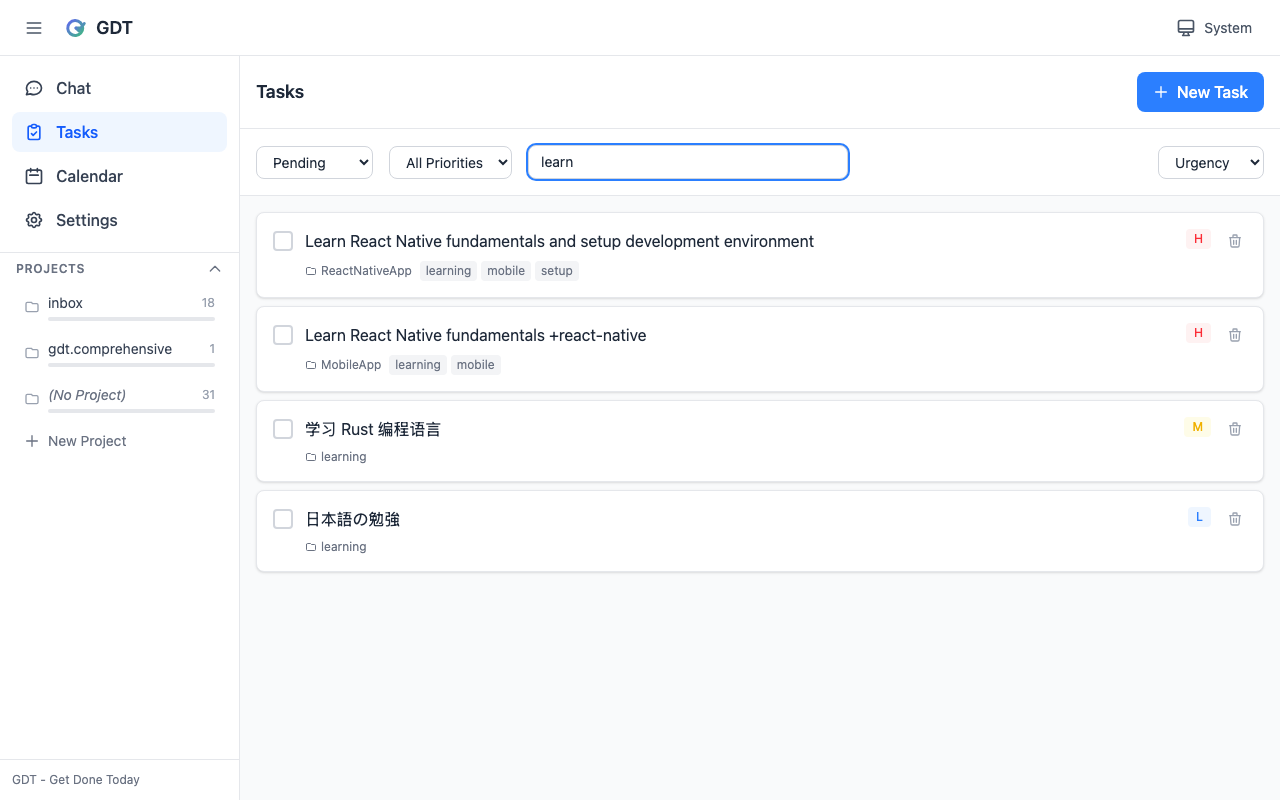
Both interfaces share the same data and AI capabilities — switch between them anytime based on your mood or task.
Next Steps
Ready to start?
- Install GDT — Takes just a few minutes
- Quick Start — Try the basic features
- Web UI Guide — Learn about the visual interface
- Task Decomposition — GDT's most powerful capability
- Personalized Learning — How GDT adapts to you